Heading

Heading

Heading

Heading

Heading
Heading

Lorem ipsum dolor sit amet, consectetur adipiscing elit. Suspendisse varius enim in eros elementum tristique. Duis cursus, mi quis viverra ornare, eros dolor interdum nulla, ut commodo diam libero vitae erat. Aenean faucibus nibh et justo cursus id rutrum lorem imperdiet. Nunc ut sem vitae risus tristique posuere.

What’s a Rich Text element?

This is a subheading and where it goes in the document flow

The rich text element allows you to create and format headings, paragraphs, blockquotes, images, and video all in one place instead of having to add and format them individually. Just double-click and easily create content. The rich text element allows you to create and format headings, paragraphs, blockquotes, images, and video all in one place instead of having to add and format them individually. Just double-click and easily create content. The rich text element allows you to create and format headings, paragraphs, blockquotes, images, and video all in one place instead of having to add and format them individually. Just double-click and easily create content.

The rich text element allows you to create and format headings, paragraphs, blockquotes, images, and video all in one place instead of having to add and format them individually. Just double-click and easily create content. The rich text element allows you to create and format headings, paragraphs, blockquotes, images, and video all in one place instead of having to add and format them individually. Just double-click and easily create content. The rich text element allows you to create and format headings, paragraphs, blockquotes, images, and video all in one place instead of having to add and format them individually. Just double-click and easily create content.

This is an h2 heading inside rich text

A rich text element can be used with static or dynamic content. For static content, just drop it into any page and begin editing. For dynamic content, add a rich text field to any collection and then connect a rich text element to that field in the settings panel. Voila!

Static and dynamic content editing

A rich text element can be used with static or dynamic content. For static content, just drop it into any page and begin editing. For dynamic content, add a rich text field to any collection and then connect a rich text element to that field in the settings panel. Voila!

Static and dynamic content editing

A rich text element can be used with static or dynamic content. For static content, just drop it into any page and begin editing. For dynamic content, add a rich text field to any collection and then connect a rich text element to that field in the settings panel. Voila!

Static and dynamic content editing

A rich text element can be used with static or dynamic content. For static content, just drop it into any page and begin editing. For dynamic content, add a rich text field to any collection and then connect a rich text element to that field in the settings panel. Voila!

Static and dynamic content editing

A rich text element can be used with static or dynamic content. For static content, just drop it into any page and begin editing. For dynamic content, add a rich text field to any collection and then connect a rich text element to that field in the settings panel. Voila!

A rich text element can be used with static or dynamic content. For static content, just drop it into any page and begin editing. For dynamic content, add a rich text field to any collection and then connect a rich text element to that field in the settings panel. Voila!

How to customize formatting for each rich text

Headings, paragraphs, blockquotes, figures, images, and figure captions can all be styled after a class is added to the rich text element using the "When inside of" nested selector system.


Forest

Forest is a productivity app that helps you stay focused on the important things in life. Whenever you want to have a focused time, you can plant a tree, and the tree will grow while you focus on your work. This article will analysis how motion is used in Forest app by examining 3 key user flows, good practices, bad practices, and suggestions for improvement will be discussed.

The good

1.  Clever use of circular slider
2. Combining sound into motion

The bad

1. Overuse bounciness in spring animation
2. Animation delay
3. Sound volume
4. Inconsistent motion

To improve

1. Subtler animation, remove overshoot
2. Reduce animation delay
3. Subtler sound design
4. Use consistent motion to teach user behaviour

Flow 1 - Start a focus session

The good

The launch experience for Forest is smooth and no fuss, on the splash screen they present the app logo (the lovely plant) and the product value (stay focused, be present), sets a positive tone for the in-app experience.

The first screen is the focus screen where Forest smartly using a circular slider (a chain animation) to link the focus time and the growth of a plant. As the user drags the green dot along the circle, the time and the plant grow correspondingly. The circular slider is most often used to display a numeric value change, but Forest replaced it with the plant growing animation, which makes setting a focus time a satisfying experience.

Start a focus session is a key flow for users in terms of user coverage and use frequency, and majority of users will use this feature multiple times per day. Using the circular slider can also speed up this task, to set a focus session, only 2 steps needed, drag the time you want to focus on, and click the start button. To set a more personalised session, you can click the plant to pick the tree, pick the time, and choose a tag, then click start. Notice the bounce animation they use when you changing the plant? The motion used just add more playfulness to your users experience :).

Another worth notice animation for this flow is the pop up animation use to inform the state change. When a user starts to plant a tree, the pop up window will show up and inform the user the timing is started as well as the result of fail to accomplish the task. Therefore, reinforcing the positive action (which is stay focus). As long as a user does not click never show again, this animation will autoplay every time the user plant a new tree. This animation aims to help users to accomplish their goal and ultimately good for the product and business.

To improve

Suggestion: Reduce the overshoot in the spring animation.
Rationale: Spring animation is a powerful tool when crafting the character of your app. However, bounciness should only be used when you have a strong reason for it. Majority of the app/web design overuse the bounciness in spring animation, and fail to create a smooth and seamless experience that doesn't distract users from their task at hand. When you refer to the best motion practice in the market, you will see that Apple is very restricted in the way they use the bounciness (only 2 were used in the entire system).

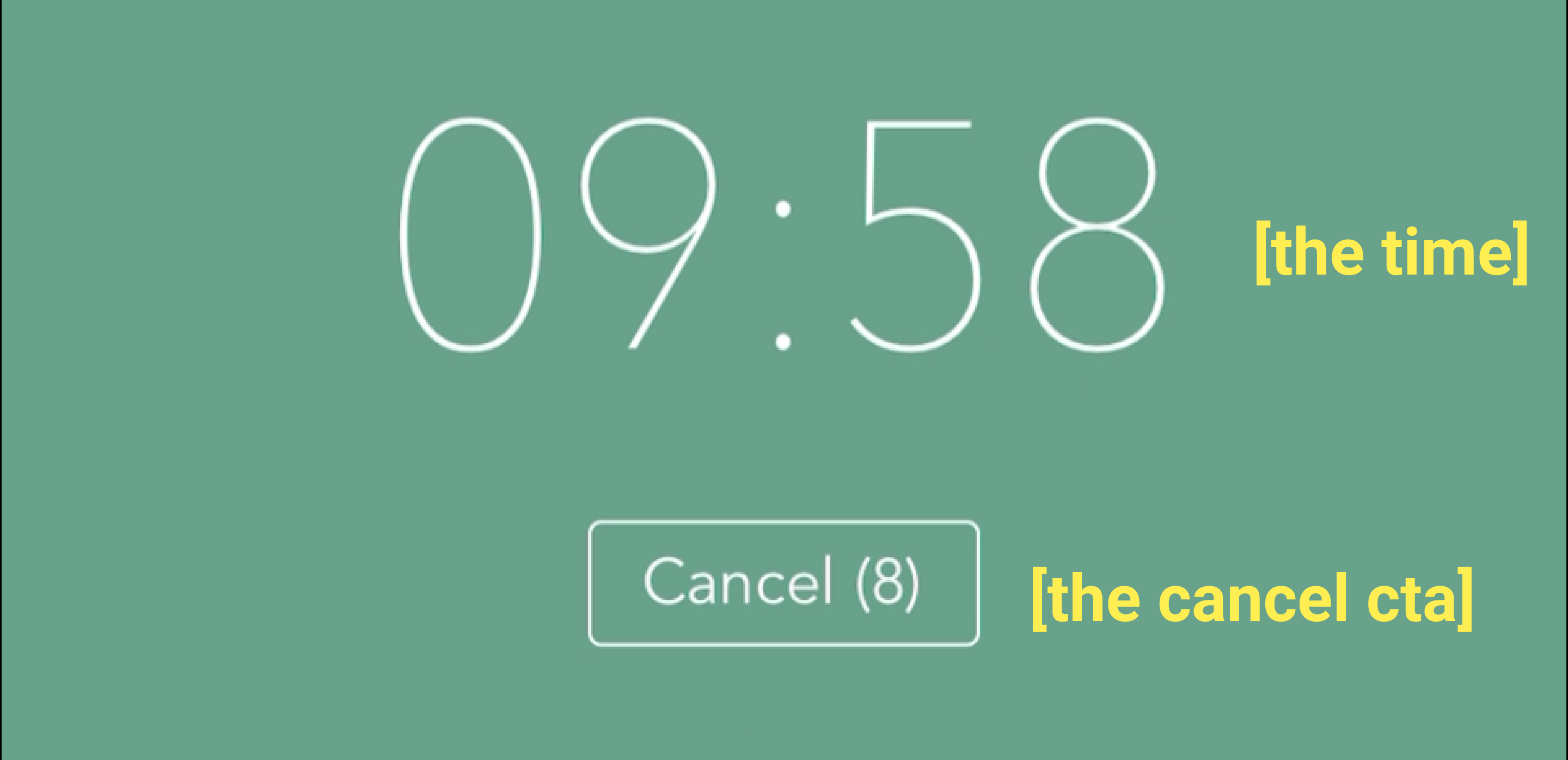
Suggestion: Remove the move in animation for [the time] and [the cancel cta] + remove the delay of [the cancel cta] + only change the opacity of the two elements.
Rationale:
The move in animation can distract users attention, while their main focus should be directed to a pop up window (the spring animation we mentioned above). The delay between the [cancel cta] and [the time] enlarged this distraction, a sutler option of simple opacity change could be a better solution for the task.

Flow 2 - Check progress

The good

Check study progress is another important flow for forest users. To check the process, users need to open the hamburger menu, and click the first item, forest. Then users are able to check their day, week, month and year progress. When user swap between them, they will see the bouncy trees and the bouncy bar graphs (spring animation is used).

Sound is a powerful tool that goes hand in hand with motion. When using the right sound in a lightweight motion, you will make users feel "it feels good to click this" and reinforce users behaviour. Adding sounds to motion it's also a clever way to build your product character, to make your app more memorable for the user. The click of the hamburger menu is accompanied by a mechanical sound, and the swapping behaviour is accompanied by different sounds volumes (volume based on your progress, longer focus time = higher volume).

Together, the spring animation and the sound effect cleverly communicated the progress to the user.

To improve

Suggestion: The bouncy animation is a bit stiff, the experience feels abrupted, can consider to change the parameter to make the curve more smooth.
Rationale: Curve is the key to animation, different parameter combination gives a totally different feel to your product. Find the right curve for your brand character, and always ensure it feels smooth and fluid.

Suggestion: Apply little or no overshoot for spring animation, especially, for the bar graph.
Rationale: Curve is the key to animation. The bounciness can distract the user from checking the data.

Suggestion: Reduce the response time of the bar graph.
Rationale: Users are sensitive to latency. Why we say that? Well, imagine when you using any tool in the physical world, and there's a delay to it, you would feel off if that happens. This is the same with mobile/web - our tool for obtain information, the unnatural delay will leave the user confused and frustrated about your product.

Flow 3 - Buy new plants

The bad

To buy new plants, the user needs to open the hamburger menu and click store (notice that the opening time for store is longer than any other page in forest, don't know why but it was worth to check out the reasons behind and improve it accordingly), and they can scroll down to see different plants or click any card to check more in detail. However, after the user click the plant card, the card slide in from the top, and move out to the bottom.

To improve

Suggestion: Change the detailed view expand from the card rather than slide in from the screen.
Rationale: Transitions motion should be smooth and provide clarity on where a user has come from, so that it teaches your users behaviour. When the user click a card that triggers a detailed view, it's more logical to design the detailed view appear from its origin rather than slide in from the side of the screen. Making the detailed view appear from its origin can better orient users and help them understand the your apps structure.

Others

The bad

In the end, I want to explain how the above 3 motion examples fail to teach users behaviour.

Motion can be used to teach users behaviour. The universal side bar is a good example of this. When we click the hamburger icon, the side bar will slide in from the left, click the areas outside the sidebar or slide the sidebar to the left will close it. The question is, how would users know they can close it by swiping to the left? Well, this is where the power of motion comes into play. We human have a consistent sense for space, and the symmetric transaction of motion can act as a hint to direct users gesture. Isn't that magic?

In the forest example, all the 3 cards above are move in from the top and exit from the opposite direction. This motion is contradicted to our cognitive behaviour (the consistent sense for space).

Another similar problem is the inconsistency in how a user can interact to close the card, in the 1st and 3rd example, the card disappears automatically, however, for the 2nd one, the user can also close the card by clicking the close button. Different user behaviours are encouraged for similar features, and this can confuse our users.

To improve

Suggestion: Replace the auto disappear with a simple cancel button, remove the move in/out card animation to a simple opacity change animation.
Rationale: To reduce the confusion user might have when interacting with your app, and use consistent motion to teach behaviour. Since all the cards contain CTA (change state as the 1st, see details as the 2nd, share as the 3rd) and you would want your users to click it, rather than when a user about to click it and it disappeared right before the action.